
LuckyStart Mobile App
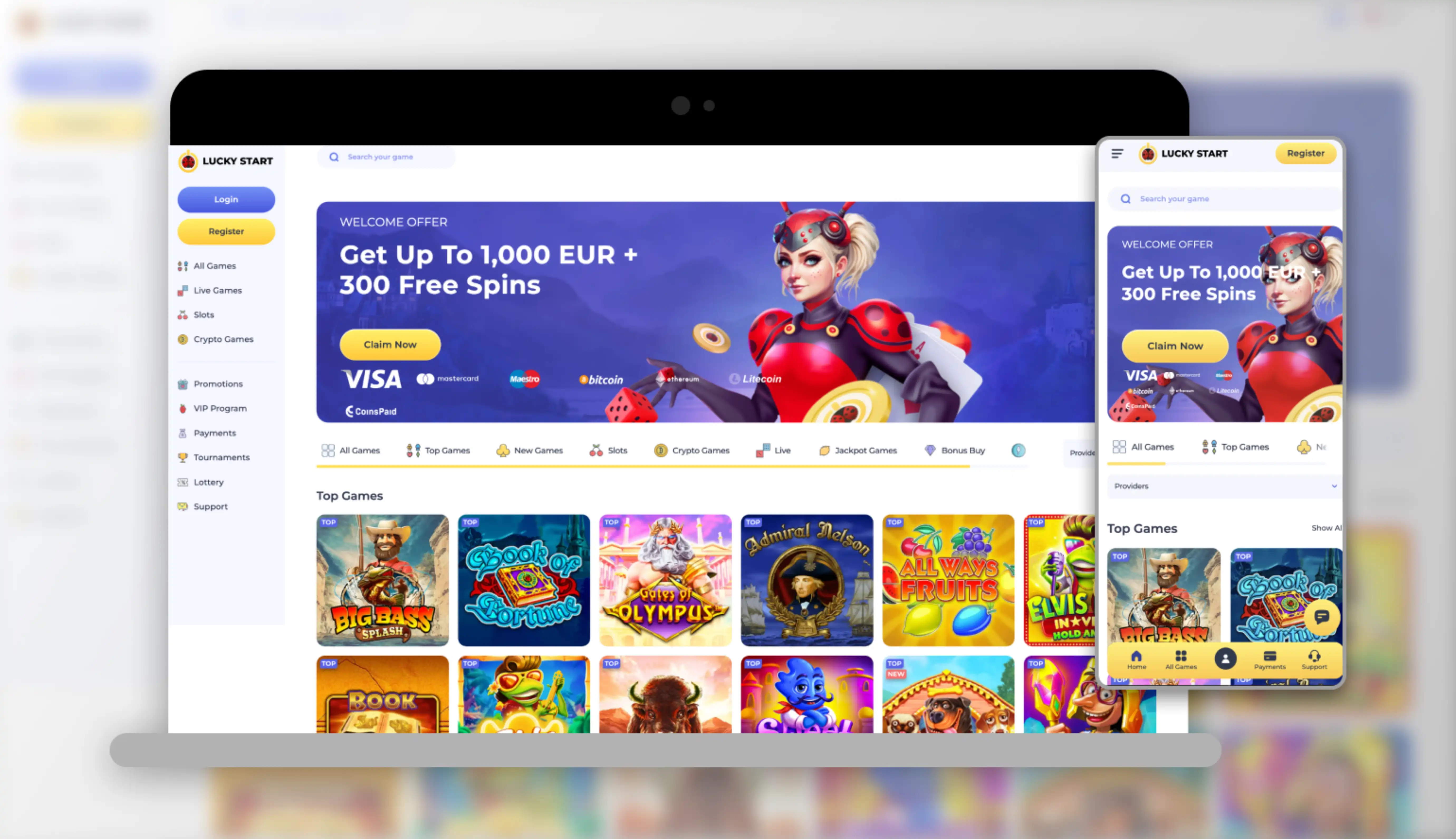

At LuckyStart, we know that modern players want to spin the reels wherever they are, and that's exactly why we built our casino around instant mobile access. Whether you're waiting for a coffee or relaxing on the couch, our platform keeps the entire lobby of over 2,000 games in your pocket, ready to load in seconds through your browser.
Here at Lucky Start, we don't ask you to download anything from an app store. Instead, we offer a responsive mobile web experience that adapts instantly to your screen, whether you're using an Android phone, an iPhone, or a tablet. Our LuckyStart app experience runs directly through your browser, so there's no storage space taken up and no outdated files to worry about.
Getting Started: How to Access the LuckyStart Casino App
Getting onto Lucky Start casino from your phone takes just a few taps. We've designed the process to be as smooth as possible for new and returning players alike.
- Open your mobile browser (Chrome, Safari, or any browser you prefer)
- Go to the official luckystart.com address
- Bookmark the page or save it to your home screen for one-tap access next time
- Log in with your existing details, or register a new account in under two minutes
- Make your first deposit and claim your welcome package automatically
For Android Users
If you're on an Android device, our site opens directly in Chrome or any browser you have installed. We recommend adding the LuckyStart page to your home screen, which creates an app-like icon so you can launch the casino as quickly as any installed application. There's no APK file to sideload and no settings to change on your device.
For iOS Users
iPhone and iPad players get the same smooth treatment at Lucky Start. Open Safari, visit our site, and use the "Add to Home Screen" option from the share menu. This gives you a shortcut icon that launches straight into full-screen mobile gaming, bypassing browser bars for a cleaner, app-style layout.
Logging Into Your Account on Mobile
Once you've saved the shortcut, logging into LuckyStart casino is as simple as tapping the icon and entering your credentials. We use the same secure login system across desktop and mobile, so your password, two-factor settings, and account history stay synced no matter which device you use. If you ever forget your password, our recovery process on mobile works exactly the same as on a desktop browser. Don't have an account yet? Check out our LuckyStart sign up process to get started in minutes.
Why Players Choose the LuckyStart Casino App Experience
We built our mobile platform around speed, variety, and reliability. Here's what you can expect when you play with us on the go:
- Instant loading with no download, install, or update required
- Access to the full lobby, including slots, live casino tables, jackpot games, and pokies for our Australian players
- Secure encrypted sessions that match the protection level of our desktop site
- Smooth navigation between sections like Top Games, New Games, and Jackpot Games
- Consistent performance whether you're on 4G, 5G, or home Wi-Fi
Our Lucky Start library includes titles from over 100 providers, among them Pragmatic Play, NetEnt, Evolution, and Hacksaw Gaming. All of these studios optimise their games for mobile screens, so spinning reels or joining a live blackjack table feels just as crisp on a phone as it does on a desktop monitor. For players from Australia and New Zealand, our pokies collection is fully represented in the mobile lobby, with the same filters and search tools you'd find on the full site.
Managing Withdrawals From Your Phone
We understand that cashing out should be just as convenient as depositing. From the mobile cashier, you can request a LuckyStart withdrawal using the same methods available on desktop, including e-wallets, bank transfer, and crypto. Minimum withdrawal starts at EUR 20 or the equivalent, and daily, weekly, and monthly limits apply exactly as they do on the full website. Keep in mind that verification documents, such as a photo ID and proof of address, may be requested before your first payout is approved, and this process is identical across devices.
Claiming Bonuses From the LuckyStart App
One of the biggest advantages of playing with us on mobile is that every promotion is available right from your phone. Our welcome package, worth up to EUR 4,500 plus 300 free spins across four deposits, is claimed the same way whether you're on a laptop or a smartphone. The first deposit bonus of 100% up to EUR 500 plus 150 free spins is credited automatically, no code required, and subsequent deposit bonuses just need the relevant promo code entered at the mobile cashier.
| Deposit Stage | Bonus | Free Spins |
|---|---|---|
| 1st Deposit | 100% up to EUR 500 | 150 |
| 2nd Deposit (code LUCKY2) | 100% up to EUR 1,000 | 50 |
| 3rd Deposit (code LUCKY3) | 50% up to EUR 1,000 | 100 |
| 4th Deposit (code LUCKY4) | 25% up to EUR 2,000 | - |
We also run a weekly Fabulous Friday Reload and the Super Sunday free spins offer, both of which are easy to activate from your phone through the promotions tab. A minimum qualifying deposit of EUR 20 (or the equivalent in your local currency) unlocks these offers, and wagering requirements of 40x apply across the welcome package. For full details on all current offers, visit our LuckyStart bonus page.
Customer Support While You're on the Move
We offer round-the-clock assistance for mobile players through the following channels:
- Live Chat: Available 24/7 directly from the mobile site
- Email: support@luckystart.com
- FAQ Section: Accessible from the mobile menu for quick answers
Our support agents can help with anything from login issues to bonus questions, and the chat window is fully optimised for smaller screens so you're never stuck scrolling through a clunky interface.
Security and Fair Play on Mobile
Security doesn't take a back seat just because you're playing on a smaller screen. We at LuckyStart maintain the same licensing standards, encryption protocols, and identity verification procedures across every device. Our casino operates under a Tobique Gaming Commission e-gaming licence, and disputes can be escalated through EGIS, an independent alternative dispute resolution service. We also remind players that the use of VPNs to access our platform from restricted regions is strictly prohibited and may result in forfeited winnings.

Final Thoughts on Playing With Us on Mobile
We've worked hard to make sure that choosing Lucky Start for your mobile sessions feels just as polished as sitting down at a desktop. With no app store download, instant browser access, and a full suite of games, bonuses, and banking options at your fingertips, we think you'll find our mobile experience hard to beat. Join us today at LuckyStart Casino, claim your welcome package, and discover why so many players now prefer gaming entirely from their phone.
FAQ
Do I need to download an app to play at LuckyStart?
No, we don't require any download. Our entire casino runs through your mobile browser, giving you instant access without using storage space on your device.
Is the LuckyStart casino app available for both Android and iOS?
Yes, we support both operating systems equally. You can add our site to your home screen on either Android or iOS for app-style access.
Can I claim bonuses through the mobile site?
Absolutely. We make all our promotions, including the welcome package and reload bonuses, available directly from the mobile cashier.
Are withdrawals the same on mobile as on desktop?
Yes, we process LuckyStart withdrawal requests the same way regardless of device, using the same limits, methods, and verification steps.
Is it safe to enter payment details through the mobile browser?
Yes, we use the same encryption and security protocols on mobile as we do on desktop, so your information stays protected at all times.
What should I do if the mobile site won't load?
We recommend clearing your browser cache or trying a different connection. If the issue continues, our live chat team is available 24/7 to help you get back into the game.
Content updated: October 20, 2026